


A select few Storyblok partners were invited to Chicago for hands-on training with FlowMotion, Storyblok’s new content operations and automation platform. BizStream was one of them. Here’s what we learned and where we see it creating value.
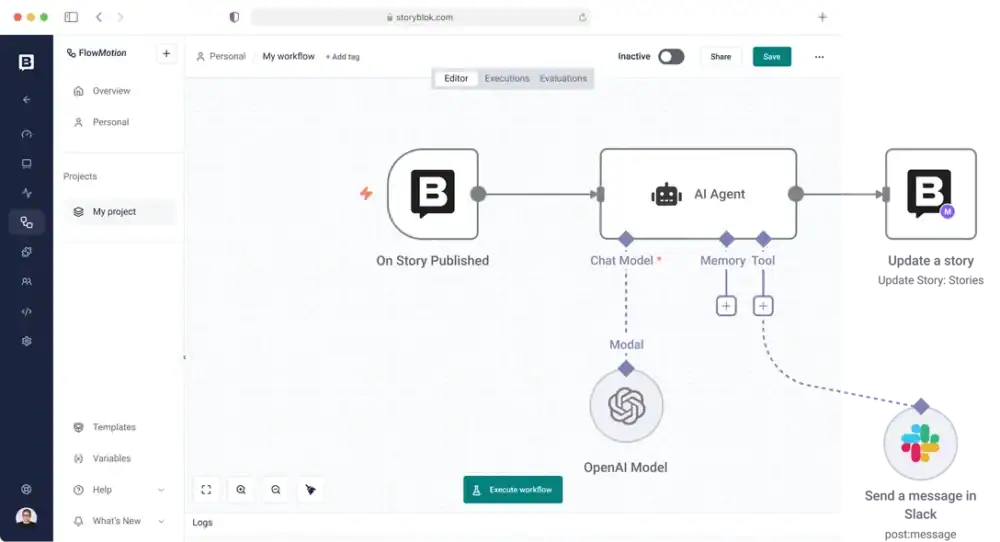
FlowMotion is a workflow automation engine built directly into the Storyblok interface. It’s built on n8n, but Storyblok has extended it with custom nodes that integrate directly with their Content Delivery and Management APIs. If you can do it in the Storyblok interface, you can do it in FlowMotion. Retrieve content, update stories, manage assets, create components, trigger publishes. A wide range of actions are available as drag-and-drop nodes, and the nodes evolve with the platform as APIs change.
It responds to essentially all the same webhook events that Storyblok currently exposes: story published, unpublished, deleted, moved, asset uploaded, replaced, workflow stage changed, release merged, draft content saved, and more. On top of those, you get the full set of n8n trigger types: cron schedules, incoming webhooks, chat events. So you can kick off workflows from inside or outside of Storyblok.
Content teams don’t just write and publish. They coordinate reviews, chase approvals, sync product data, and notify stakeholders. Most of that work happens in Slack threads, email chains, and shared spreadsheets. FlowMotion lets us build that coordination layer directly inside the platform. A few concrete examples:
FlowMotion can trigger on workflow state changes, publishes, saves, content moves, and asset uploads. You could notify reviewers when a story moves to “Ready for Review,” monitor how long something has been sitting in review and send follow-up reminders, or enforce SLAs and escalate when deadlines are about to slip. The building blocks are the same; you’re just wiring up different triggers to different actions depending on what the team needs.
FlowMotion has AI nodes and supports connections to OpenAI, Anthropic, Gemini, and other LLMs. When a story is created or updated, a workflow can generate summaries, suggest tags, produce SEO metadata, or translate content, and write the results directly back into Storyblok fields. The combination of triggered events running through AI and the ability to update content on the other side opens up many workflow possibilities.
A simple example: automated asset tagging. An image is uploaded, triggering a workflow that sends the image URL to an LLM for analysis, generates relevant tags, and writes them back to the asset. No one had to tag anything manually. That’s a five-minute workflow to build, and it saves time on every upload going forward.
A product page update in Storyblok can trigger a Jira ticket, update a Shopify listing, kick off a HubSpot campaign, and post a notification to a release channel. One content event, multiple downstream systems, zero manual handoffs.
When content is saved or moved to a review stage, a workflow can run it through SEO scoring, accessibility validation, and geo-targeting checks. If something comes back with an issue, the editor receives an interactive Slack message that explains the problem, suggests an updated title or heading, and lets them approve the fix right there in Slack. The workflow handles the round trip, and the content gets updated based on their response.
Getting hands-on time with FlowMotion with the Storyblok team was valuable. Two things stood out.
First, the breadth of available integrations. There are hundreds of pre-built connectors for Slack, Jira, HubSpot, Shopify, OpenAI, Anthropic, Google Sheets, and a long list of others. That catalog makes many common content operations workflows feasible without writing custom integration code.
Second, it’s hosted inside your Storyblok instance. Your content team doesn’t need to log into another tool. There’s no separate platform to manage, no additional vendor to onboard. Everything related to your content workflows lives in the same place as your content.
The most immediate opportunities are notifications and approvals. Every content team we work with has some version of the “how do I know when something needs my attention” problem. FlowMotion makes that solvable without custom development.
Beyond that, we see real value in building AI into content operations in a structured and repeatable way. Not one-off prompts in a separate tool, but automated pipelines that enrich, validate, and transform content as part of the normal publishing workflow.
There’s also a practical angle for migrations. FlowMotion supports manual triggers, so you can build a workflow that runs only when you tell it to. That’s useful for one-time jobs like migrating assets or content from another system into Storyblok. We do a lot of CMS migrations, and having that capability built into the platform will save real time.
More broadly, a lot of the custom code we’ve written over the years for webhooks and scheduled tasks could move into FlowMotion. Right now, that logic lives in the site’s codebase, maintained by developers, deployed with the application. If a content team wants to change how an integration works, they file a ticket and wait for a dev cycle. In FlowMotion, that logic lives in the Storyblok instance. Content editors and admins can see the workflows, understand what they do, and modify them without having to go back to development. As long as it’s within n8n’s capabilities, the content team can own it.
Not every workflow should be automated, and automation doesn’t remove the need for governance. AI-assisted workflows still need review rules. Someone needs to define who owns what, what gets approved manually versus automatically, and what success looks like before a workflow goes live. FlowMotion gives you the building blocks, but the process design still matters. Teams that think through ownership and approval criteria up front will get much more out of it than teams that just start wiring things together.
FlowMotion puts more of the workflow right where content work is already happening. That can be a big win for teams that want to reduce manual effort, create more consistency, and give content owners more say in how things get done.
Whether you’re evaluating Storyblok for the first time or looking to get more out of your current setup, we can help you think through the right approach for your team.
FlowMotion is a workflow automation engine built directly into Storyblok. It’s built on n8n and extended with custom nodes that connect to Storyblok’s Content Delivery and Management APIs, letting teams automate content operations without leaving the platform.
Common use cases include approval and review notifications, AI-powered content enrichment, automated asset tagging, SEO and accessibility checks, and cross-system integrations with tools like Slack, Jira, HubSpot, and Shopify.
Not necessarily. FlowMotion uses a drag-and-drop node editor with 500+ pre-built integrations, and many workflows can be built without writing custom code. For teams that need more flexibility, there’s also a code node that supports custom transformations in JavaScript or Python.
FlowMotion includes AI nodes and supports connections to OpenAI, Anthropic, Gemini, and other LLMs, including self-hosted models for teams with data control or compliance requirements. This makes it possible to build automated pipelines for content summarization, tagging, translation, and metadata generation.
FlowMotion is Storyblok’s enterprise automation layer. Access is available through enterprise plans. Contact our team for current pricing and availability details.

Stay up to date on what BizStream is doing and keep in the loop on the latest in marketing & technology.