

If you’ve ever been involved in building a website, you know the frustrating gap between design and launch. Designs look great in Figma, but migrating them into a CMS often requires time, technical work, and extensive back-and-forth.
That’s exactly what the Figma to Storyblok plugin is designed to fix.
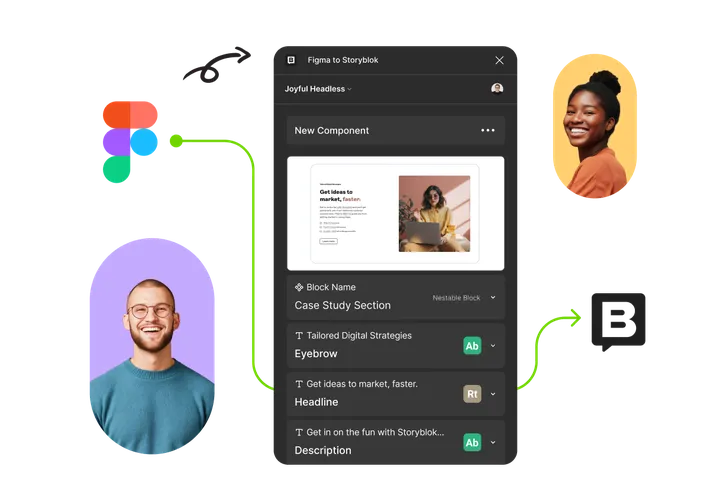
The Figma to Storyblok plugin connects your Figma designs directly to Storyblok. Instead of manually rebuilding designs in the CMS, the plugin lets you convert Figma designs into Storyblok content components with just a few clicks.
In a traditional workflow, going from a Figma design to a CMS (Content Management System) involves several steps and people:
This is where the Figma to Storyblok plugin shines. It essentially eliminates several of these steps by converting your Figma designs directly into Storyblok content components. No more guessing how a design should be structured in the CMS – the plugin does the heavy lifting for you with a one-click import that generates all the necessary content blocks and fields in Storyblok based on the Figma design.
Even if you’re not a designer or developer, this plugin can have a big impact on your website projects.
By automating how designs become CMS content, the plugin removes a big chunk of setup work. This means pages can go live faster and projects move forward with fewer delays.
Because content components are created directly from the design, there’s less room for misunderstandings. The website ends up looking much closer to the original design.
Designers can stay in Figma, developers don’t need to manually rebuild content structures, and content editors get clean, ready-to-use components. Everyone sticks to what they do best.
The plugin helps designers, developers, and content teams stay aligned. Everyone works from the same source, reducing confusion and the need for endless clarification messages.
Once the components are in Storyblok, your team can easily update text, images, and layouts without touching the design file again. That’s especially helpful for marketing teams and ongoing content updates.
The Figma to Storyblok plugin is especially valuable when:
If your designs already live in Figma and your site uses Storyblok, this plugin fits naturally into your workflow.
You might be wondering, “Okay, but isn’t there any other way to link design and CMS?” There have been other approaches, but none quite as direct and user-friendly as this Figma to Storyblok integration:
In summary, while you could stick to doing things the old way or try piecemeal tools, the Figma to Storyblok plugin provides an all-in-one, streamlined solution. It takes a process that usually requires multiple tools and handoffs and wraps it into one neat pipeline.
Now, to keep expectations realistic, the Figma to Storyblok plugin is amazing, but it assumes your Figma file is organized in a somewhat logical way. You don’t need to be overly technical (no coding needed at all), but a well-structured Figma design (using components, consistent naming, etc.) will yield the best results. The plugin basically takes what you give it in Figma and maps it to Storyblok. So if a design is a tangled mess of layers, you might need to tidy it up a bit for a clean import. That said, Storyblok has some guides on how to structure your Figma files for optimal results, and once you do it a couple of times, it becomes second nature.
The good news is that none of this is “hard”; it’s more about a little bit of planning. And the time spent planning a clean design file is still far less than the time you’d spend coding or configuring things manually. In other words, even with a bit of preparation, you’re coming out way ahead.
Also, using the plugin doesn’t lock you in or remove flexibility. After import, developers can still tweak the components, add custom logic in the front-end code, and content editors can edit content as usual. The plugin jump-starts the process, but your team stays in control of the final outcome.
The Figma to Storyblok plugin makes the jump from design to content much smoother. For website owners, that means faster launches, fewer errors, and happier teams.
You don’t need to understand the technical details to benefit from it — you’ll notice the difference in how quickly things move and how closely the live site matches the original vision.
If you’re using Storyblok (or thinking about it), the Figma to Storyblok plugin is well worth trying. It’s a simple tool that solves a very common problem — and once you use it, it’s hard to go back.

Stay up to date on what BizStream is doing and keep in the loop on the latest in marketing & technology.